Skip to content
Geeky Hacker

Geeky Hacker

Coding, Tech & Linux

  • Spring Boot
  • JPA
  • Kafka
  • Testing
    • Testcontainers
    • Mockito
  • Java
  • Kotlin
  • Linux
  • DevOps
    • AWS
    • CI/CD
    • Docker
    • Kubernetes
  • Database
    • MySQL
    • PostgreSQL
  • Spring Boot
  • JPA
  • Kafka
  • Testing
    • Testcontainers
    • Mockito
  • Java
  • Kotlin
  • Linux
  • DevOps
    • AWS
    • CI/CD
    • Docker
    • Kubernetes
  • Database
    • MySQL
    • PostgreSQL
Linux

Generate your favorite Linux distribution ASCII logo in Linux Terminal

Kasra Madadipouyaby Kasra MadadipouyaLast updated on 5 June, 2024
Default featured post

Linux is the most flexible and powerful OS I have ever seen. Many useful as well as fun programs/tools are developed for Linux or to be exact *nix systems by the great open source community. For sure, there are much more fun does exist in Linux terminal than any other imaginable OS. One of the fun thing is Cowsay command which is installed by default in Linux Mint distro. I don’t explain about Cowsay here, you better explore it yourself.

In Linux you can also generate a great list of *nix ASCII logos easily by using Screenfetch command. You can install it on Debian/Ubuntu based distributions by using this command,

$ sudo apt-get install screenfetch

The output of the command in Ubuntu systems would be look like this.
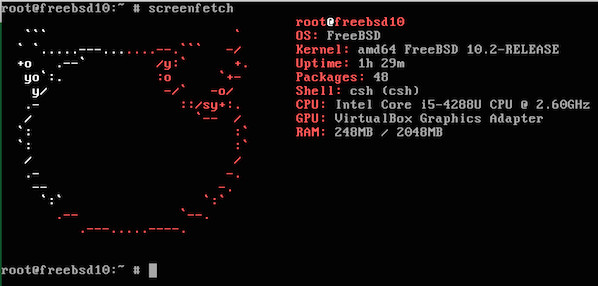
You also can generate ASCII logo for another Linux distribution by using -D command. For instance, you can make FreeBSD Unix in by using following command.

$ screenfetch -D freebsd

Share this:

  • Click to share on X (Opens in new window) X
  • Click to share on Facebook (Opens in new window) Facebook
  • Click to share on LinkedIn (Opens in new window) LinkedIn
  • Click to share on Reddit (Opens in new window) Reddit
  • More
  • Click to share on Pocket (Opens in new window) Pocket
  • Click to share on Pinterest (Opens in new window) Pinterest
  • Click to share on Tumblr (Opens in new window) Tumblr
  • Click to share on Telegram (Opens in new window) Telegram
  • Click to share on WhatsApp (Opens in new window) WhatsApp
  • Click to email a link to a friend (Opens in new window) Email
  • Click to print (Opens in new window) Print

You might also like

Copy website URL from Lynx

Copy website URL from Lynx

Last updated on 4 March, 2024
Default featured post

How to create Debian package for Python script

Last updated on 5 June, 2024
How to screencast with FFmpeg

How to screencast with FFmpeg

Last updated on 30 December, 2024

Popular

  • High-performance data fetching using Spring Data JPA Stream High-performance data fetching using Spring Data JPA Stream
  • Synchronize audio and video with FFmpeg Synchronize audio and video with FFmpeg
  • Test Spring Kafka consumer and producer with EmbeddedKafka Test Spring Kafka consumer and producer with EmbeddedKafka
  • How to fix grub/i386-pc/normal.mod not found How to fix grub/i386-pc/normal.mod not found
  • Configure SSH key-based authentication on Raspberry Pi Configure SSH key-based authentication on Raspberry Pi
  • Terms of Service
  • Cookie Policy
  • Privacy Policy
  • X
  • GitHub
  • Telegram
  • YouTube
  • RSS Feed
  • Cheat Sheets
  • Donate
  • Contact
© 2013-2025 Geeky Hacker Powered by WordPress and Bam.
Donate Ethereum

Yet another cryptocurrency that is super popular. You can donate us in Ethereum.

Geeky Hacker wallet number: 0x1f98767fB7c51efc35C313B0015C6aB453D4ED31

Donate BAT

BAT is a coin that is used by Brave Browser which is getting more popularity day by day.

Geeky Hacker wallet number: 0x40146D985b995E5bB5b2A7FDc618db689a811DCB

Donate Bitcoin

The unbeatable, the father and the king of kings, Bitcoin!

Geeky Hacker wallet number: 1NaGzvbXQtM9PCduXgmFeXe8D4i5C1nDyu


Loading Comments...


